[Expand for Full Series Overview] This is Part 2, following the Case Study, “Content Operations System Revamp: Fragmented to Centralized.”
During the early stages of Nivationist, a simple system worked well enough to collect ideas and draft early blog posts. But after launching official blogging operations, that fragmented setup quickly hit its limits. This two-part case study details how we rebuilt Nivationist’s content operations from the ground up, transforming an ad-hoc idea collector into a scalable, end-to-end production engine.
- Part 1: Strategic Blueprint & Systems Architecture: An inside look at the inflection points that forced a total system rethink. We map the journey from initial operational pain points to business-aligned solutions, showing how personal workflow habits and strategic growth goals shaped the new pipeline.
- Part 2: Build, Execution & Database Design: The step-by-step walkthrough of the new architecture in action. Featuring before-and-after workflow diagrams, automated actions, and database schemas, this post reveals how the proposed solutions were actualized.
Core Innovations in this Revamp
Systematized Prioritization & Planning: A predictable, repeatable matrix for content intake, scheduling, and execution.
Authentic Brand & Ownership Controls: Structural guardrails designed to maximize automated operational efficiency without surrendering content ownership or core brand voice.
Modular, Swappable SOP Workflows: Flexible, sequential production steps powered by custom AI prompts and standardization toolkits.
Closed-Loop Single Source of Truth: Structural end-of-workflow verification gates that guarantee single-truth accuracy across all assets.
Deliverable-Driven Progress Tracking: Replacing subjective status updates with tangible output milestones.
Dual-Layer Content Management: Clear, explicit separation between macro strategy and micro content execution.
Universal AI Engine: Standardized prompting protocols engineered for active learning, iterative refinement, and automated action generation.
All the Posts in this Series
[Previous Post] Content Operations System Revamp: Fragmented to Centralized
[Current Post] Content Operations System: Scale Without Losing Authenticity
ACTUALIZATION OF PROPOSED SOLUTIONS
Building an intelligent content discovery and prioritization system that continually reconnects old ideas to current business priorities, audience needs, content gaps, and published content.
Process Evolution: Manually scrolling an increasingly buried idea library → Using AI as a contextual rediscovery layer that surfaces 3–5 overlooked ideas while retaining human editorial judgment over what actually gets prioritized.
Figure 1: Diagram showing the difference in system navigation and actions taken for reviewing and evaluating blog ideas from the repository for production.
With the second iteration, filtering of blog ideas became automated based on actual, written strategy, content gaps, audience needs, etc. The incorporation of a project with a custom AI prompt within Claude AI ensures the output is presented in a way that best supports my thinking/analysis process during review. See how the first iteration of Claude AI prompts cut blog publishing time by 36% before this system-level revamp took shape.
The DatabaseView: Blog Ideas Library has also been revamped to encourage blog idea branching, brand-specific idea organization, and removing manual keyword input after the successful incorporation of AI in blog idea rediscovery.
Figure 2: Diagram comparing the use cases of the DatabaseView: Blog Ideas Library and differing workflow steps between an idea generation goal in Iteration 1 and an end-to-end content operations goal in Iteration 2.
Idea Prioritization & Planning – Human Review
The capturing of blog ideas remains the same.
With the incorporation of the Blog Planning & Rediscovery AI prompt via Claude to refine and automate the blog idea discovery process, the human review process that comes afterwards became essential to maintain operational control, brand authenticity, and content creativity to prevent total AI dependency and loss of ownership.
- Blog Idea Branching & Modification: Organized via The 3 Nivationist Principles
- In-Database Knowledge Hub: Connected via relational and rollup properties from multiple streams of resources
- Readwise (highlights on saved online resources)
- Book notes (summaries and personally annotated notes)
- Reflection notes (500+ handwritten-to-electronically transcribed career notes)
- Structured AI chat insights (reusable “seeds” extracted from unstructured within AI conversations)
- Transitional Workspace: DatabaseView: Priority Ideas
Blog Idea Branching & Modification: Organized via The 3 Nivationist Principles
The 3 Nivationist Principles are a self-discovered framework built from 6 years of my own career-building experience that helps me and others who want to bring an idea to life from the inside out by
- Creating a Critical, Self-Loving Mindset,
- Building Personalized Routines and Systems, and
- Designing Productive, Inspiring Living Spaces.
This self-tested framework also serves as the underlying, interlinked themes for each of Nivationist’s published content, regardless of the main topic. Explore the 3 Nivationist Principles to see how mindset, routines, and environment turn one idea into a purposeful career from the inside out.
In this revamp, the Blog Ideas Library has removed the heavily manual keywords that are used to describe the idea and content for discoverability, as the incorporation of the Blog Planning & Rediscovery AI prompt has made this step obsolete. As AI became increasingly important for scalability of the business and personalization of my work habits for ultimate productivity, the importance of ensuring operational control, brand authenticity, and content creativity to prevent total AI dependency and loss of ownership became increasingly vital.
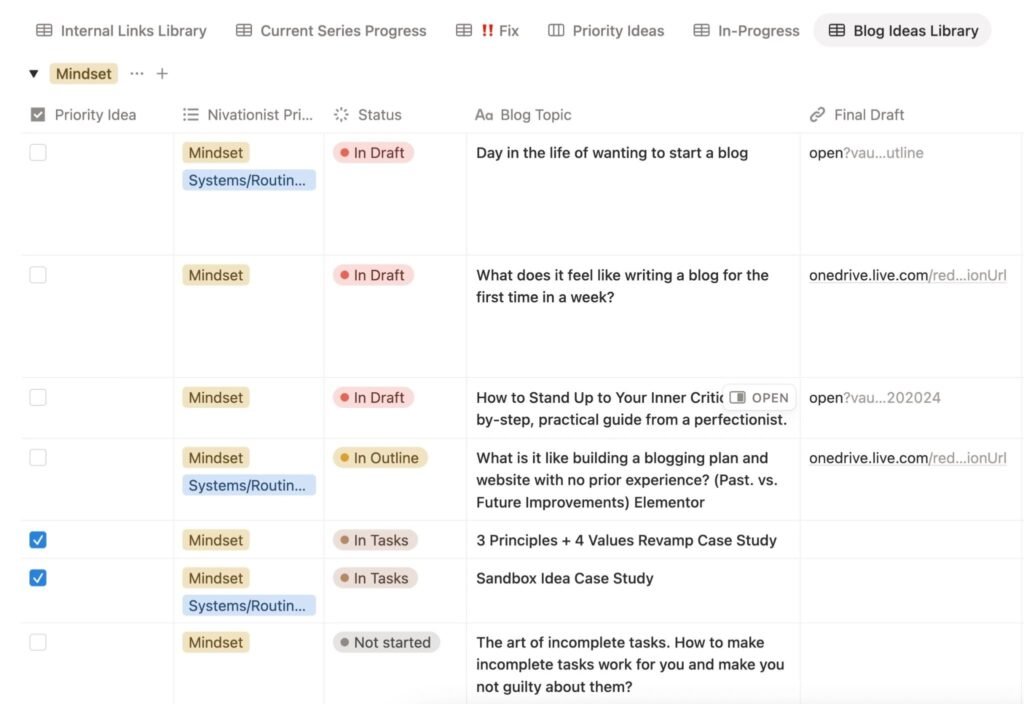
The Blog Ideas Library is now grouped by the 3 Nivationist Principles as an added layer of creativity preservation and innovation amid the influx of AI-generated content.
The 3 Nivationist Principles serve as the base layer to then freely combine, modify, and generate ideas with unique perspectives that cross-reference one or all 3 Nivationist Principles.
Grouping blog ideas by the 3 Nivationist Principles provides a loose boundary in which the idea branching process can flourish but still be brand-aligned.
Process Evolution: High-maintenance, manual keyword taxonomy → Using the three Nivationist Principles as a flexible directional layer for brand-specific organizing, repurposing, expanding, combining, and modifying the potential of every blog idea.
Figure 3: The revamped DatabaseView: Blog Ideas Library with the incorporation of a selecting blog ideas into Priority Idea (View) transition workspace, grouped by brand-specific Nivationist Principles.
In-Database Knowledge Hub: Connected via relational and rollup properties from multiple streams of resources
The Knowledge Hub lives in Notion. It’s a collection of databases, where each database is either synced (e.g., Readwise) or a reference to a specific stream of knowledge resources (e.g., book notes, transcribed career notes, reflections, etc.). Get started with Readwise Reader to save what you read, highlight it, and sync those highlights into your own knowledge hub.
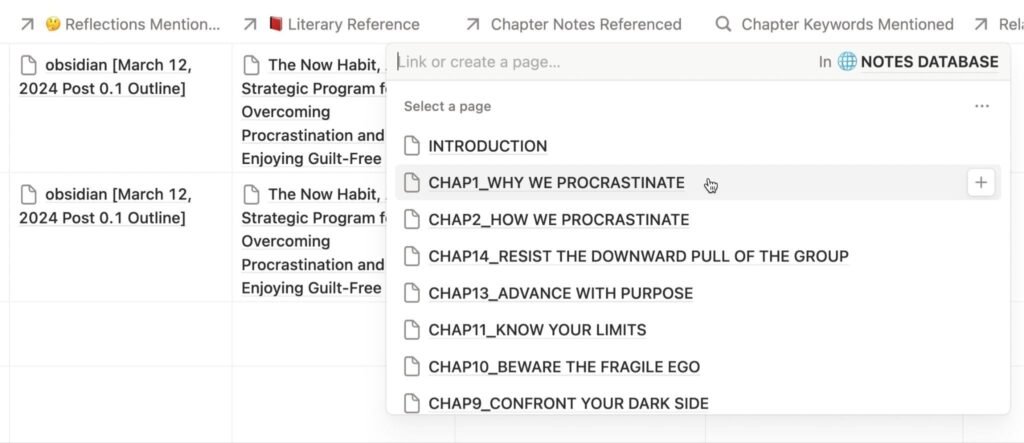
In the DatabaseView: Blog Ideas Library, each stream of knowledge resource is linked for selection as part of a relational and/or rollup property that helps to reference a specific resource directly from another database. See how Notion relations and rollups work so you can connect one database’s notes and resources directly to another.
The ability to attach relevant resources to blog ideas helps to
- track the inspiration-to-publication journey of each blog post,
- see the maturity and readiness of blog topics based on the # of resources currently available, and the
- approximate research required to complete a blog post if there are limited relevant resources.
Figure 4: Close-up of some relational/rollup properties that are used for resource referencing and blog write-up during Idea Prioritization & Planning within the DatabaseView: Blog Ideas Library
As AI becomes more of an operational partner, many of the insights, thought process, and solutions are increasingly embedded within unstructured AI chats. Explore Tiago Forte’s capture-organize-distill-express method for turning scattered notes and chats into reusable ideas you can act on.
These are highly valuable for
- traceback/outlining the start and evolution of a thought, idea, process, or solution, and
- excavating hidden insights and blog topics with high readiness and maturity scores for content production.
Process Evolution: Capturing insights and ideas that heavily rely on in-the-moment process, brainstorming, luck, or inspiration → Turning unstructured ideas and solutions from unstructured AI chats into structured, reusable seeds of insight.
Figure 5: Difference in generating blog ideas between iteration 1 and 2 with the inclusion of a custom AI prompt for insight extraction and building a knowledge database to store reusable, structured insight “seeds.”
Currently, the extracted insights are experimental and used exclusively to generate newsletter content. It will be gradually deployed to other content types (e.g., case studies, blog series) after further prompt refinement and workflow standardization. Follow how idea curation and newsletter drafting were first streamlined with Claude AI, so you can see where extracted insight “seeds” fit into a real publishing routine.
Transitional Workspace: DatabaseView: Priority Ideas
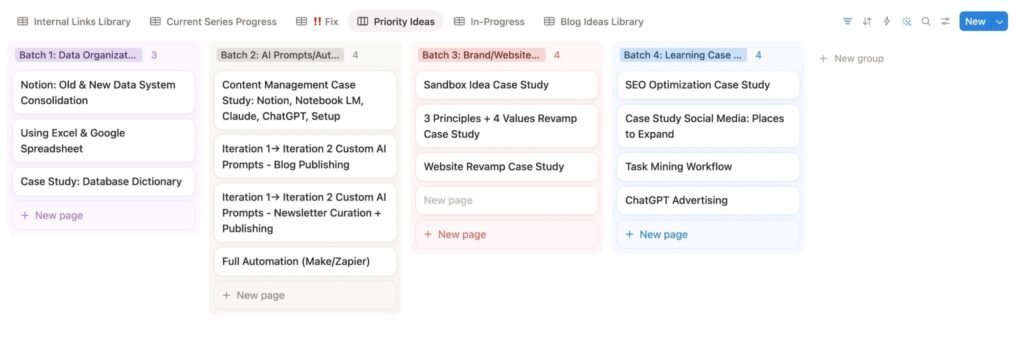
Combining multiple blog ideas, generating unique blog topics, and cross-examining across categories require a linked but clean workspace for planning and finalizing ideas.
In the DatabaseView: Blog Ideas Library, blog ideas that are checked as “Priority Idea” will be moved to DatabaseView: Priority Ideas. The Priority Ideas view is essentially a flexible canvas within a database view made to ease actual planning needs. Learn how to turn a pile of ideas into a batched content plan you can actually schedule, the same way priority ideas get topic-batched here.
Figure 6: Current canvas of the DatabaseView: Priority Ideas with finalized blog ideas that are topic-batched for group content production and scheduling.
Creating Outline or Draft – Designed to Maximize Actionability in Content Ingestion
Transitioning an initial idea generation repository into an end-to-end content operations pipeline requires making each operational component: visible, standardized, scalable, and action-focused.
Whether a process revamp is successful depends on its design for increasing productivity and removing frivolous administrative overload just for the sake of presentability. Read how a lightweight system protects your focus so admin upkeep never crowds out the actual writing.
Figure 2: [previously shown] Diagram comparing the use cases of the DatabaseView: Blog Ideas Library and differing workflow steps between an idea generation goal in Iteration 1 and an end-to-end content operations goal in Iteration 2.
Process Evolution: Manually tracking ambiguous workflow stages with an “In Progress” status → Using tangible deliverables as evidence of progress → Let Notion manage the workflow while Google Docs/Sheets document the work actually completed.
Figure 7: Diagram showing an iterative transition from updating in-progress status to a content ingestion pipeline that standardizes and breaks down case study production steps and uses actual deliverables as progress markers.
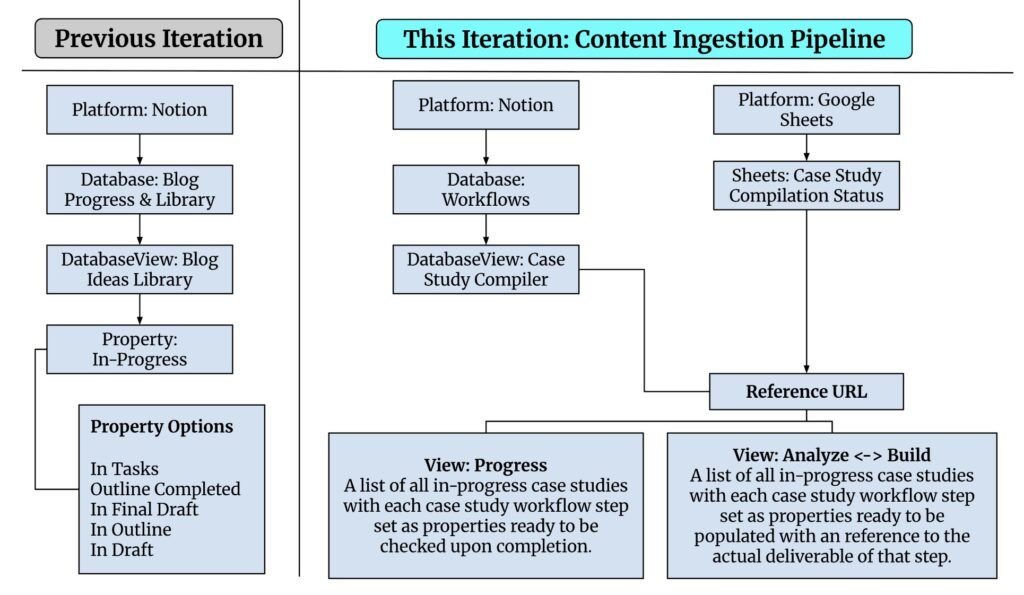
In the previous iteration, monitoring the status of “in-progress” blog ideas from outline to final draft required unnecessary administrative overload between each step of the process, which breaks writing focus and makes it difficult to maintain accurate, timely updates.
In this iteration, the steps of analyzing, compiling, outlining, and writing a case study are standardized to ensure consistency and quality of output, prevent writer’s block, and clarify the expected standard of deliverables, which prevents distractions in content production.
Instead of an arbitrary status update, progress in writing a case study is rewarded by using the actual deliverable for each step as status markers.
This system feature has several advantages:
This sheet manages and tracks the case study writing process and lives inside Google Drive, the content writing and primary content storage platform, which prevents unnecessary multi-tool swapping.
- Google Sheets allows flexibility in adding or subtracting case study compilation steps in alignment with anticipated iterative improvements in the workflow process.
- The case study compilation process is broken down into manageable steps that are easier to actualize, measure, and improve.
- The Sheets: Case Study Compilation Status shows all in-progress case study compilations in one place without having to remember the title or keywords for search and discovery.
Process Evolution: Fragmented storage of AI prompts and workflow checklists/SOPs → Centralized database with filtered views based on use-case and easy-to-update workflow steps with all required resources referenced.
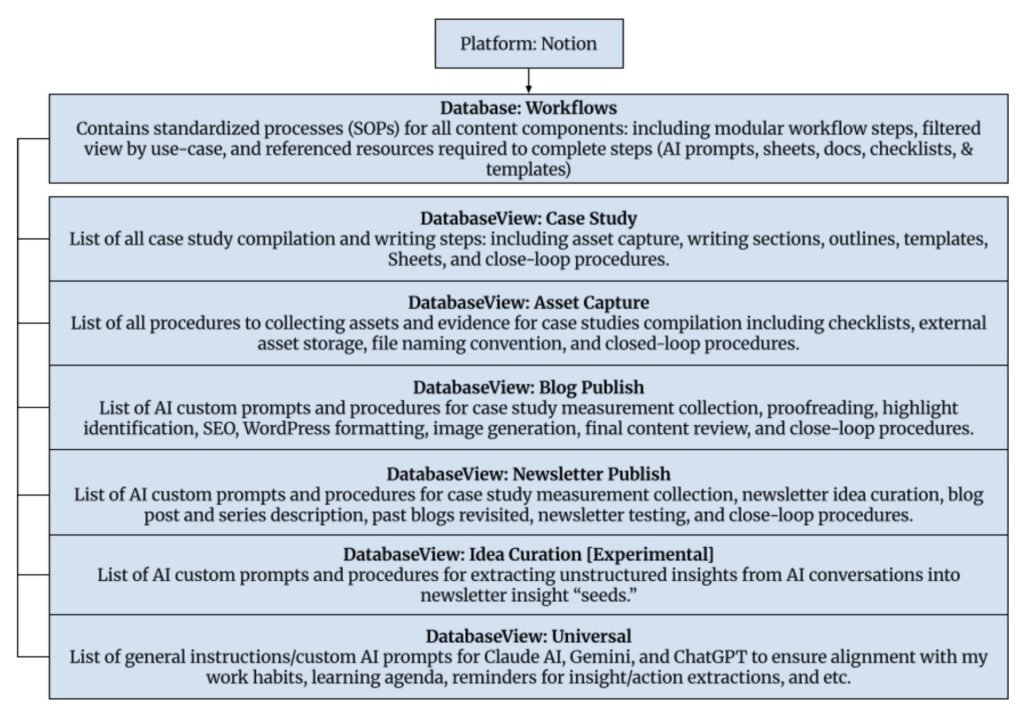
All content components, from asset capturing (e.g., images, diagrams, etc.), blog publishing, newsletter publishing, idea curation, and case study compilation, are documented in the Database: Workflows in Notion.
The Database: Workflows shows filtered views dedicated to each content component and use-case. Each content component/use-case view is a workflow with steps on how to start the workflow, specific AI prompts or resources required to complete the step, and close the loop so all databases stay timely updated. Learn how Notion views and filters let one database answer different questions, so you can build use-case views of your own.
Figure 8: All filtered views and their descriptions within the Database: Workflows that are designed to satisfy all use cases of the current content operations pipeline.
Nivationist is currently solo-operated and has been open for content operations since April of 2026.
There is a financial constraint to improve content operations in AI using only the Free Plan for the sake of experimenting with the best-fit use case for each workflow step and preventing single AI platform dependency before committing to a Premium Plan.
Process Evolution: Single-AI-tool workflow constrained by platform limits → Modular, multi-tool approach where Notion manages the workflow and prompts while Claude, ChatGPT, and Gemini become interchangeable execution tools selected based on the needs of each step.
To spread the Free-limit usage across multiple AI platforms effectively, an experiment to assess the best-fit AI platform (Claude, Gemini, & ChatGPT) for each step of the Blog Publish and the Newsletter Publish workflows is conducted.
Best-Fit Per Workflow Task Type to AI Platform
- Claude: Reserved for tasks that require referencing Notion databases and files from Google Drive.
- ChatGPT: Great for conversational insight extraction, identifying/organizing the thought process from problem to solution, and image generation.
- Gemini: Great for YouTube video content summaries and transcribed notes for the Knowledge Hub.
In terms of scalability, all AI prompts are referenced as a Google Doc file in a modular Workflows database in Notion to allow centralized workflow/prompt management, AI context referencing, and easy updates on task sequencing and further expansion of workflow.
Allowing AI prompts to be referenced as a Google Doc file allows for easy iterative improvements via written changes, commenting, batching, or breakdown of steps through tabs.
The distinction in workflow management between Notion and Google Docs is a clear example of tool-based level management.
- Notion: Used for system-level management, a bird’s-eye view reference, and planning of each component of the content operation pipeline. It includes databases (at-a-glance workflows, blogs, newsletters, etc.) and high-level checklists/templates (e.g., long-term task breakdown/prioritization, content idea selection, brand identity hex codes, content quality assurance, content close-loop directions, etc.)
- Todoist: Used for immediate task execution and checkoffs. It includes content close-loop reminders, recurring deliverables, and scheduling of tasks after performing task prioritization in Notion for the week.
- Google Drive: Used for management that requires frequent written updates (e.g., workflows), task-level, and content-specific management. It includes in-progress spreadsheets of specific content (using actual deliverables as progress markers), actual final drafts of blogs/case studies, and current/past iterations of custom AI prompts.
Workflow steps that require iterative improvements (e.g., custom AI prompts, content quality checklists, content strategy guidelines, etc.) are consolidated into Google Drive. That is because the files allow commenting to quickly highlight and jot down improvement suggestions during task execution, right at the moment when problem detection is intuitive and fresh in mind.
During a designated review day that includes workflow iterative improvement, Gemini will be used to consolidate all non-redundant comments and their highlighted AI prompt section into a separate file that will be referenced within Notion’s task management database for further prioritization before relaying to Todoist for in-week execution.
Figure 10: A diagram showing the actions taken and the underlying system for reporting troubleshooting needs and iterative improvement suggestions for future task prioritization and implementation.
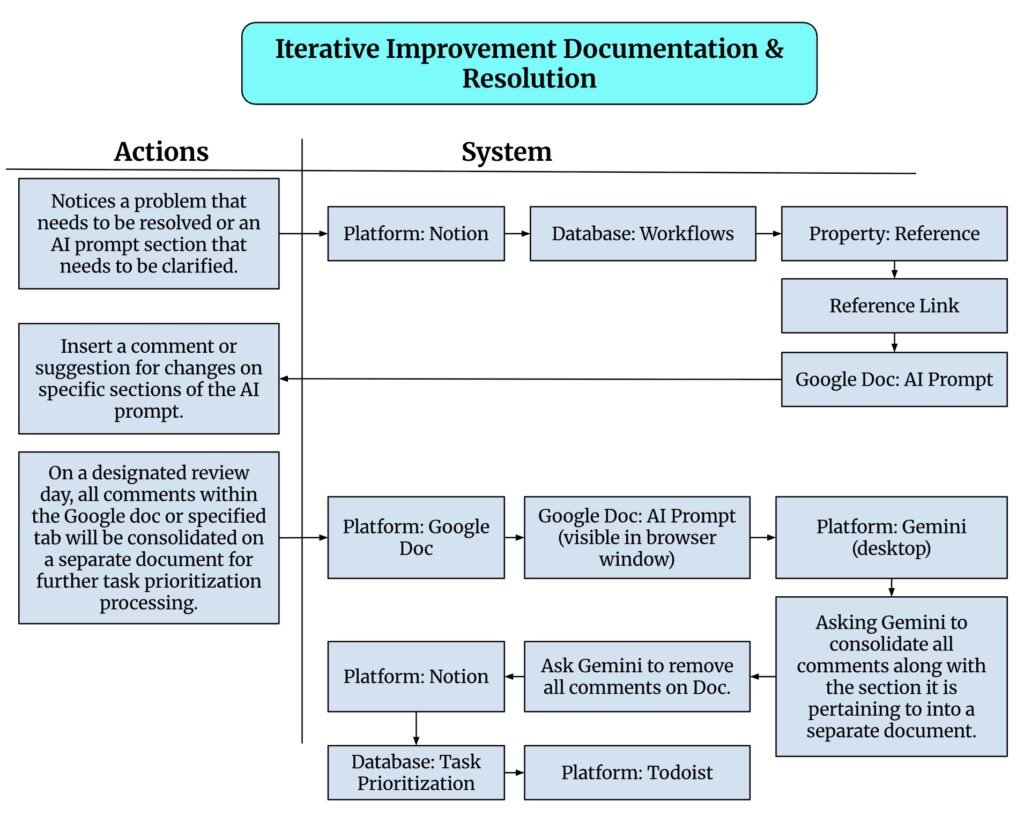
Figure 11: A high-level overview of the entire content production and ingestion pipeline and its interlinked relationships and dependencies.
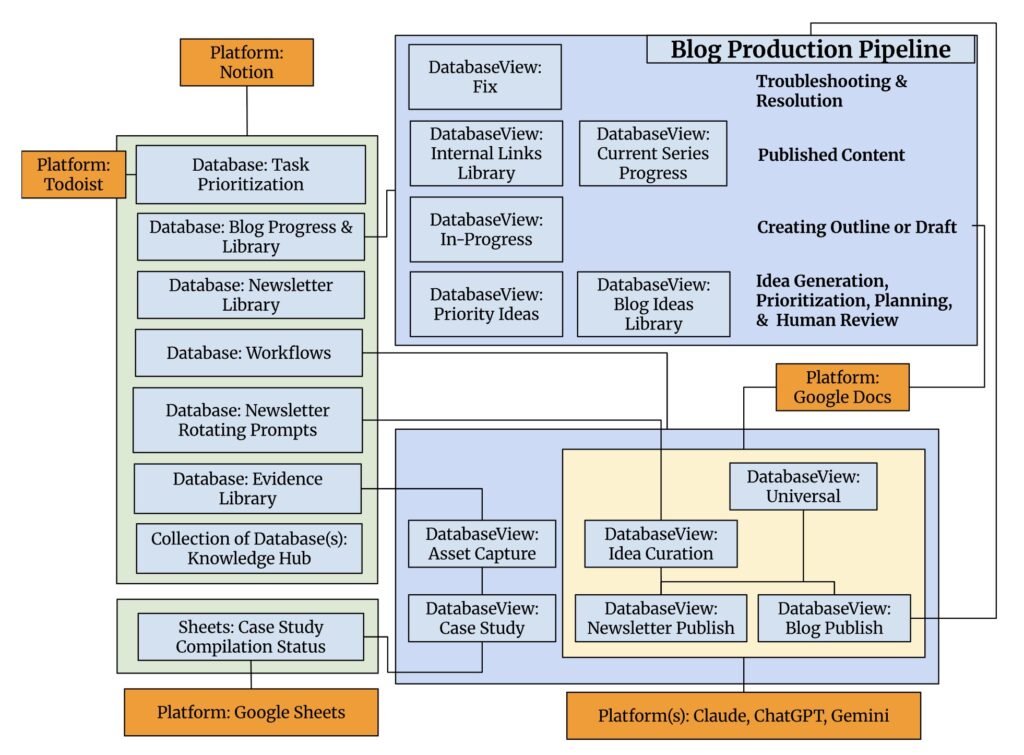
This revamp marks a major transition and has successfully turned a blog idea repository with fragmented AI prompts into a scalable, interlinked content production and ingestion pipeline. Get the next iteration of this content operation in your inbox: subscribe to the Nivationist newsletter for behind-the-scenes updates as the system keeps evolving.
Notion: System-level Management and Knowledge Hub
It contains the following databases:
- Task Prioritization: A repository for all long-term, unprioritized tasks. Periodically, tasks will be evaluated for prioritization, broken down into manageable tasks, and then relayed to Todoist for immediate execution during the week.
- Blog Progress & Library: The management hub for content idea generation, planning, prioritization, writing production, published content management, and content troubleshooting.
- Newsletter Library: Contains all published newsletters and their respective links for easy management and preview of blog posts advertised and story references within each newsletter.
- Workflows: The management hub for all standardization of processes and content operation workflows. The database contains filtered views based on specific use-cases of key content production components. It also contains modular, swappable sequential workflow steps that govern how to start a workflow, the standards of quality/ completeness of a task, resources needed for task completion with custom AI prompts, and how to conclude the workflow to close the loop to maintain single-truthness.
- Newsletter Rotating Prompts: Contains two filtered views.
- 1.) A repository of all structured insight “seeds” extracted from AI-chat conversations that are scored based on a maturity scoreboard.
- 2.) A database that tracks the story category for variety-based planning and the actual stories allocated to each published newsletter.
- Evidence Library: Logs the name, metadata tags, description of media, and the business significance of media of all captured assets, screen recordings of workflow iterations, featured images, website images, logos, etc., that are stored within an external drive for easy discovery and reusability of resources.
- Knowledge Hub: A collection of databases that consolidates and references book notes, summaries, 500+ transcribed notes, AI-chat insight “seeds, “ YouTube video summaries, Readwise online resource highlights/notes, etc., that are stored in various locations over the years in one centralized location for content production.
Google Drive: Writing Production, Iterative Improvement Reporting, & Content-level Management
It satisfies 3 layers of use:
- Content Writing: All outlines and drafts are done on Google Docs. It’s the central hub for all final drafts of posts before publishing to WordPress.
- Workflow Improvement: All suggestions for workflow improvements, especially custom AI prompts with evolving standards, strategy changes, quality checklists, and response output criteria, are reported by voicing through highlighted comments, consolidation of highlights, and moved to the Prioritization database in Notion for further processing before relaying to Todoist for execution.
- Content-Level Management: Each content item, especially case studies, monitors “in-progress” status by using each step of the compilation and write-up deliverables as markers of progress using Google Sheets.
AI (Claude, Gemini, and ChatGPT): Automation of Repetitive & Standardized Operations
To ensure an efficient use of AI to optimize operations while retaining strategic ownership, brand authenticity, and content idea creativity, AI is currently deployed on the following workflows and standardization of processes (SOPs) that are stored in the Workflows database.
- Universal: This custom AI prompt is used across Claude, ChatGPT, and Gemini. It outlines the preferred presentation output, context about Nivationist (brand voice, audience type, etc.), working habits, learning agendas, reminders for insight extractions, and converting chat discussions into actions.
- Blog Publish: This custom AI prompt illustrates the workflow steps, standardizes the output, etc., for processes that follow after the final draft of a blog post or case study is completed and ready for publication.
- Newsletter Publish: This custom AI prompt illustrates the workflow steps, standardizes the output, etc., for processes that follow the curation of bi-weekly newsletters (including stories, letter to audience, recent blog post release, blog series introduction, etc.).
- Idea Curation: This custom AI prompt illustrates the workflow steps, standardizes the output, etc., for processes that extract insight “seeds” and calculate the maturity score against a specific scoreboard/guidelines as a starting point for writing newsletter stories that remove or limit writer’s block. This is currently an experimental workflow that will later be implemented into case study and blog series writing, beyond just newsletters.
Before/After Content Operations Comparison
| Workflow Capability | Before Revamp | After Revamp |
| Idea capture & inspiration repository | ✓ | ✓ |
| Centralized content database | ✓ | ✓ |
| Clear content status tracking | ✓ | ✓ |
| Reusable prompts & resources | ✓ | ✓ |
| Standardized workflow for recurring tasks | Partial | ✓ |
| Support consistent publishing at scale | Partial | ✓ |
| Use-case-based workflow views | — | ✓ |
| Trace a post from inspiration → publication | — | ✓ |
| Trace decisions/changes made throughout production | — | ✓ |
| Actionable next steps at each stage | — | ✓ |
| Prompts linked directly to workflow tasks | — | ✓ |
| Reduce cross-platform searching/clicking | — | ✓ |
| Reduce repetitive manual database upkeep | — | ✓ |
| AI-assisted idea discovery | — | ✓ |
| AI-assisted prompt/workflow improvement | — | ✓ |
| AI-assisted review of improvement comments | — | ✓ |
| Capture improvement opportunities during execution | — | ✓ |
| Dedicated review → task creation process | — | ✓ |
| Prioritize improvements before execution | — | ✓ |
| Connect improvements to Todoist execution | — | ✓ |
| Closed-loop improvement system | — | ✓ |
| Repurpose insights from completed work | — | ✓ |
🔗 See What to Explore Next [toggle/expandable section]
All the Posts in this Series
[Previous Post] Content Operations System Revamp: Fragmented to Centralized
[Current Post] Content Operations System: Scale Without Losing Authenticity
Summary of This Case Study Series
During the early stages of Nivationist, a simple system worked well enough to collect ideas and draft early blog posts. But after launching official blogging operations, that fragmented setup quickly hit its limits. This two-part case study details how we rebuilt Nivationist’s content operations from the ground up, transforming an ad-hoc idea collector into a scalable, end-to-end production engine.
- Part 1: Strategic Blueprint & Systems Architecture: An inside look at the inflection points that forced a total system rethink. We map the journey from initial operational pain points to business-aligned solutions, showing how personal workflow habits and strategic growth goals shaped the new pipeline.
- Part 2: Build, Execution & Database Design: The step-by-step walkthrough of the new architecture in action. Featuring before-and-after workflow diagrams, automated actions, and database schemas, this post reveals how the proposed solutions were actualized.
Core Innovations in this Revamp
Systematized Prioritization & Planning: A predictable, repeatable matrix for content intake, scheduling, and execution.
Authentic Brand & Ownership Controls: Structural guardrails designed to maximize automated operational efficiency without surrendering content ownership or core brand voice.
Modular, Swappable SOP Workflows: Flexible, sequential production steps powered by custom AI prompts and standardization toolkits.
Closed-Loop Single Source of Truth: Structural end-of-workflow verification gates that guarantee single-truth accuracy across all assets.
Deliverable-Driven Progress Tracking: Replacing subjective status updates with tangible output milestones.
Dual-Layer Content Management: Clear, explicit separation between macro strategy and micro content execution.
Universal AI Engine: Standardized prompting protocols engineered for active learning, iterative refinement, and automated action generation.